Here comes to SharePoint Conference 2006, Day 2.
Microsoft Office SharePoint Server (MOSS)
- Administering SharePoint Technologies: Part 1 - Installation and configuration
- Administering SharePoint Technologies: Part 2 - Onging Management
It's all about how to install MOSS 2007, your design gold, planning and management.
- MS Office System Client Integration with MOSS 2007
Describes how Office clients, e.g. Words, Excel, PowerPoint, SharePoint Designer, work together with MOSS 2007.
- Security and SharePoint: From Services to Item-Level Access
Great, MOSS security can go into a deeper level of security.
- Customizing Your SharePoint Sites with SharePoint Designer 2007
Frontpage is out. Come along with Office System, SharePoint Designer is in and so powerful that allow you easily to customize site layout and manage workflow to get please your customers. SharePoint Designer does a pretty nice job in this area than FP.
- MOSS 2007: Taxonomy and Governance
Describes how to manage content types in MOSS 2007.
17 May, 2006


Microsoft SharePoint Conference 2006 (Day 1)
I am in Seattle to attend the Microsoft SharePoint Conference 2006 on the latest Office SharePoint 2007 technology. In this blog, I will keep you post my update everyday. Hope you enjoy it.
15 May 2006 Day 1
- Opening keynote by Bill Gates. First time to see the REAL Bill Gates, it's cool. Seems like everyone loves to see him, just like a star in the hall :)
- Breakout 1: Overview of the Web Content Management Features of MS Office SHarePoint Server 2007
- Breakout 2: Building a Community, Wikis and RSS
- Breakout 3: Compliance and Record Management with MS SharePoint Server 2007
- Hands-on lab until 8pm
----
Operating System and Database Services
Office SharePoint Server 2007 is built on the technologies and services provided by Microsoft Windows Server™ 2003 Service Pack 1 (SP1) and SQL Server 2005 (as well as SQL Server 2000).
The core and development-platform operating system services include:
• Microsoft .NET 2.0 Framework which comprises:
• ASP.NET 2.0 master pages, content pages, and Web Parts
• Pluggable service-provider models for personalization, membership, navigation, and enhanced security
• Database access services
• Internet Information Services
• Windows Workflow Foundation
• Windows desktop indexing and search services
SQL Server is the relational database used for storing all content, data and configuration information used by Office SharePoint Server 2007. SQL Server 2005 is recommended; SQL Server 2005 Express is included as a default part of the installation. SQL Server 2000 can be used as an alternative.
Windows SharePoint Services
Windows SharePoint Services (version 3) builds on the operating system and database services to support requirements ranging from a team site for a workgroup, to large enterprise portal solutions serving over 100,000 employees and staff (such as Office SharePoint Server 2007), to a corporate Internet portal supporting millions of users.
Windows SharePoint Services platform services provide the following security-enhanced, scalable, reliable, high-performance capabilities:
• Storage
• Management
• Deployment
• Site Model
• Extensibility
In addition, Windows SharePoint Services, a feature of Windows Server 2003, implements the collaboration features of the 2007 release of Office SharePoint Products and Technologies:
• Document collaboration
• Wikis and Blogs
• Really Simple Syndication (RSS) support
• Discussions
• Project task management
• Contacts, Calendars, and Tasks
• E-mail integration
• Integration with the 2007 Microsoft Office system client applications
• Offline support for SharePoint lists and document libraries, using Office Outlook 2007 as the offline client application.
Office SharePoint Server 2007: Applications and Services
Architecturally, Office SharePoint Server 2007 consists of a common set of Shared Services that support five server application components.
Server Applications
Office SharePoint Server 2007 comprises five application components:
• Portal
• Search
• Content management
• Business process
• Business intelligence
Each of these is built upon the platform services and collaboration components of Windows SharePoint Services and the Shared Services components of Office SharePoint Server 2007.
Shared Services
Conceptually similar to Shared Services in SharePoint Portal Server 2003, the Shared Services component has been completely restructured and redesigned in the Office SharePoint Server 2007 using a new services provider model.
Shared Services include virtually all of the services that are used by multiple applications in Office SharePoint Server 2007:
• Full-text and property indexing and search services
• Business Data Catalog
• Notification service for generating alerts
• User profile store
• Audiences
• Usage reporting
• Single sign-on services
18 February, 2006
The world is flat

How would we live in the information world?
Is the world a village?
This book is pretty interesting.
27 January, 2006
Overview of WinFX
At a high level, WinFX consists of these basic components:
• .NET Framework
• Microsoft® Windows® Communication Foundation (formerly code-named "Indigo")
• Microsoft® Windows® Presentation Foundation (formerly code-named "Avalon")
• Microsoft® Windows® Workflow Foundation (formerly code-named "WinOE")
.NET Framework
The core API contains classes that are shared by all types of WinFX applications. For more information, see .NET Framework Conceptual Overview. They are largely part of the System namespace as well as descendants such as System.Collections. The .NET Framework APIs include support for:
• Basic value and reference types, such as Int32, String, and Uri
• Collections and Data Structures
• Data
• Graphics and Drawing
• Input/Output
• Basic networking
• Security
• Threading and runtime services
The .NET Framework also provides support for creating Web applications and Windows applications.
ASP.NET is a unified Web platform that provides all the services needed to build enterprise-class Web applications. The classes that make up the API are largely part of the System.Web namespace, or its descendants. For details, see ASP.NET Web Applications. Windows Forms is a platform for developing Windows client applications. A Windows Forms application can also act as the local user interface in a multi-tier distributed solution. Windows Forms extends the core API with a clear, object-oriented, extensible set of classes that enable you to develop rich Windows client applications. The classes that make up the API are largely part of the System.Windows.Forms namespace, or its descendants.
Windows Communication Foundation
Windows Communication Foundation is the new service-oriented communications infrastructure built on top of web services protocols. The advanced web service support in Windows Communication Foundation provides interoperable secure, reliable, and transacted messaging. For details, see What is Windows Communication Foundation?
The Windows Communication Foundation service-oriented programming model is built on the .NET Framework and radically simplifies development of connected systems. It unifies a broad array of distributed systems capabilities in a composable, extensible architecture that supports multiple transports, messaging patterns, encodings, network topologies, and hosting models. It is the next version of several existing products: ASP.NET’s web methods (“ASMX”) and Microsoft Web Services Enhancements for Microsoft .NET (WSE), .NET Remoting, Enterprise Services, and System.Messaging. The classes that make up the Windows Communication Foundation API are largely part of the System.ServiceModel namespace and its sub-namespaces. Windows Communication Foundation supports a variety of scenarios, including:
• One-way and duplex messaging
• Synchronous and asynchronous remote procedure calls
• Callbacks
• Sessions
• Multi-contract services
• Transport- and message-based security, reliability, and ordered delivery
• Queued messaging
• Transaction support
Windows Presentation Foundation
Windows Presentation Foundation is Microsoft’s unified presentation subsystem for Windows. It consists of a display engine and a set of managed classes that allow you to create rich, visually-stunning applications. Windows Presentation Foundation also introduces XAML, which allows you to use an XML-based model to declaratively manipulate the Windows Presentation Foundation object model. To learn more, see Windows Presentation Foundation. The classes that make up the API are largely part of the System.Windows namespace or its descendants. The primary components are:
• An application model with support for navigation, windows, and dialog boxes
• UI data binding
• A rich set of extensible layout and control objects
• 2D and 3D graphics
• Animation
• Media
• Documents
Windows Workflow Foundation
Windows Workflow Foundation is a new workflow development platform built on the .NET Framework.
Windows Workflow Foundation provides a programming model for developing and executing a wide variety of stateful, long-running, persistent workflow applications. Windows Workflow Foundation provides out-of-the-box workflow functionality that for easily developing workflow-based applications such as document management, commercial page flow, IT management, and various line-of-business applications. Applications can load the workflow engine and plug a variety of runtime service components into it. Windows Workflow Foundation is highly extensible, so you can create your own custom components to address your particular business concerns. Windows Workflow Foundation also offers ASP.NET support to make it easy for you to build and execute workflows that run in the Internet Information Services (IIS)/ASP.NET environment.
14 January, 2006
Software Architect Tasks

The software architect has overall responsibility for driving the major technical decisions, expressed as the software architecture. This typically includes identifying and documenting the architecturally significant aspects of the system, including requirements, design, implementation, and deployment "views" of the system.
The architect is also responsible for providing rationale for these decisions, balancing the concerns of the various stakeholders, driving down technical risks, and ensuring that decisions are effectively communicated, validated, and adhered to.
02 January, 2006
Rational Unified Process RUP
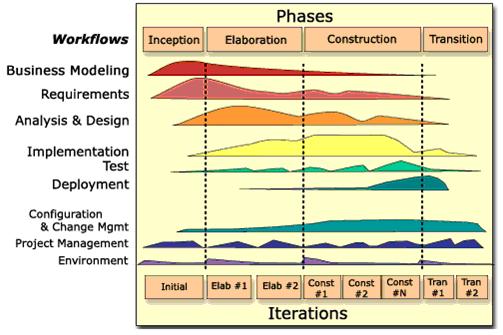
The Rational Unified Process or RUP provides a disciplined approach to software development. It is a process product, developed and maintained by Rational Software. It comes with several out-of-the-box roadmaps for different types of software projects. RUP is an iterative process that identifies four phases of any software development project. Over time, the project goes through Inception, Elaboration, Construction, and Transition phases. Each phase contains one or more iterations where you produce an executable, but perhaps incomplete system (except possibly in the Inception phase). During each iteration you perform activities from several disciplines in varying levels of detail. The above is an overview diagram of the RUP.
RUP provides guidance for all aspects of a software project. It does not require you to perform any specific activity or produce any specific artifact. It does provide information and guidelines for you to decide what is applicable to your organization. It also provides guidelines that help you tailor the process if none of the out-of-the-box roadmaps suits your project or organization.
RUP emphasizes the adoption of certain best practices of modern software development, as a way to reduce the risk inherent in developing new software. These best practices are:
1. Develop iteratively
2. Manage requirements
3. Use component-based architectures
4. Model visually
5. Continuously verify quality
6. Control change
These best practices are woven into the Rational Unified Process definitions of:
Roles – sets of activities performed and artifacts owned.
Disciplines – focus areas of software engineering effort such as Business Modeling, Requirements, Analysis & Design, Implementation, Test and Deployment.
Activities – definitions of the way artifacts are produced and evaluated.
Artifacts – the work products used, produced or modified in the performance of activities
http://en.wikipedia.org/wiki/Rational_Unified_Process
01 January, 2006
Extreme Programming XP
Extreme Programming (XP) is a lightweight code-centric software development process for small projects. It is designed by Kent Beck and came to the software industry’s attention on the C3 payroll project at Chrysler Corporation around 1997. It is based upon iterations that embody several practices such as Small Releases, Simple Design, Testing, and Continuous Integration. XP promotes several techniques that are effective for the appropriate projects.
Extreme Programming is based on 12 principles:
http://en.wikipedia.org/wiki/Extreme_Programming
Extreme Programming is based on 12 principles:
- The Planning Process -- The desired features of the software, which are communicated by the customer, are combined with cost estimates provided by the programmers to determine what the most important factors of the software are. This stage is sometimes called the Planning Game.
- Small Releases -- The software is developed in small stages that are updated frequently, typically every two weeks.
- Metaphor -- All members on an XP team use common names and descriptions to guide development and communicate on common terms.
- Simple Design -- The software should include only the code that is necessary to achieve the desired results communicated by the customer at each stage in the process. The emphasis is not on building for future versions of the product.
- Testing -- Testing is done consistently throughout the process. Programmers design the tests first and then write the software to fulfill the requirements of the test. The customer also provides acceptance tests at each stage to ensure the desired results are achieved.
- Refactoring -- XP programmers improve the design of the software through every stage of development instead of waiting until the end of the development and going back to correct flaws.
- Pair Programming -- All code is written by a pair of programmers working at the same machine.
- Collective Ownership -- Every line of code belongs to every programmer working on the project, so there are no issues of proprietary authorship to slow the project down. Code is changed when it needs to be changed without delay.
- Continuous Integration -- The XP team integrates and builds the software system multiple times per day to keep all the programmers at the same stage of the development process at once.
- 40-Hour Week -- The XP team does not work excessive overtime to ensure that the team remains well-rested, alert and effective.
- On-Site Customer -- The XP project is directed by the customer who is available all the time to answer questions, set priorities and determine requirements of the project.
- Coding Standard -- The programmers all write code in the same way. This allows them to work in pairs and to share ownership of the code.
http://en.wikipedia.org/wiki/Extreme_Programming
29 December, 2005
Software Development
I recently read 2 articles with interesting introduction (skip those advertising, it's quite true).
Do you find yourself tired after sitting in meetings all day? Do you have feelings of uselessness after weeks of bug fixing? Do you often find yourself feeling lonely, as if you've lost touch with your team and the status of your project? Are you frustrated by frequent fire drills and the sense that your project is in utter chaos? Are you hopelessly lost in a sea of changing policies and procedures with no end in sight?
If you answered yes to any of these questions, you may be clinically depressed and require extensive psychological counseling. Or maybe, just maybe, you are using the wrong software life-cycle tools. Team Foundation Server (TFS) is a software life-cycle tool designed to improve software team collaboration and increase individual productivity.
Team Foundation Server: At Work
Face it. Producing high-quality software on-time and on-budget is still a very difficult thing to do. Why is that, anyway? Let's start by admitting that software development isn't just about the software developers. In fact, there are typically many other roles involved in software projects, and the way they work together will determine the success of the project. Project teams typically consist of Project Managers, Business Analysts, Application Architects, Developers, and Testers. Unfortunately, in far too many cases, the people playing these roles find it challenging to coordinate their efforts, because they do not have tools that help them collaborate with each other. Wouldn't it be great if we had tools that not only allowed each team member to be more productive, accurate, and predictable in their work, but also to share information and collaborate more readily within their established software development lifecycle?
Microsoft Visual Studio Team System is a very significant release since, for the first time, Microsoft is targeting the entire software development lifecycle. Team System provides additional features to support Architects, Developers, Testers, and Project Managers.
Lap Around Microsoft Visual Studio Team System 2005
Visual Studio Team System

It has been a lot of confusion between VS 2005 Team System, Team Suite & Team Foundation Server (TFS). Let's make it clear.
Team System
= Team Suite (Architect+Developer+Test) + TFS
http://msdn.microsoft.com/vstudio/teamsystem/reference/default.aspx
http://lab.msdn.microsoft.com/vs2005/articles/default.aspx
http://teamsystemrocks.com
.NET 2.0 vs IBM WebSphere 6.0
Are you working on .NET or WebSphere? Have a look at this report and you'll make a difference.
"The goal of this paper is to present a comparison of Web application servers: the Microsoft .NET Framework 2.0 running on Windows Server 2003, and the latest release of IBM WebSphere Application Server, version 6.0.2.3. According to a recent IDC study from October of 2005, roughly 78% of mission critical application projects under development worldwide use an application server. In this study, IDC also found that the combination of .NET and Windows Server 2003 is now the most commonly used application server for mission critical applications, exceeding IBM WebSphere usage with 37% usage for .NET/Windows Server vs. 12% usage for IBM WebSphere."
http://www.theserverside.net/articles/showarticle.tss?id=NET2BMNovember
http://www.theserverside.net/articles/showarticle.tss?id=NET2BMNov64Bit
http://msdn.microsoft.com/vstudio/java/compare
Subscribe to:
Posts (Atom)


 Posts


